Hexagong · MIDI Generator · v1.3.5

Endgame MIDI generator

A melody and rhythm generator that lives in your browser. Pick from 104 genres and 376 scales, push it through a lab full of chaos, chop breaks down to 1/64 rolls, arrange patterns into a song and export clean MIDI for any DAW. It even works offline.

Out now Hexagong as a plugin for your DAW Buy it
  • 104 genres
  • 376 scales & modes
  • 70 drum patterns
  • 10 chaos sources
  • 128 GM instruments
  • Works offline
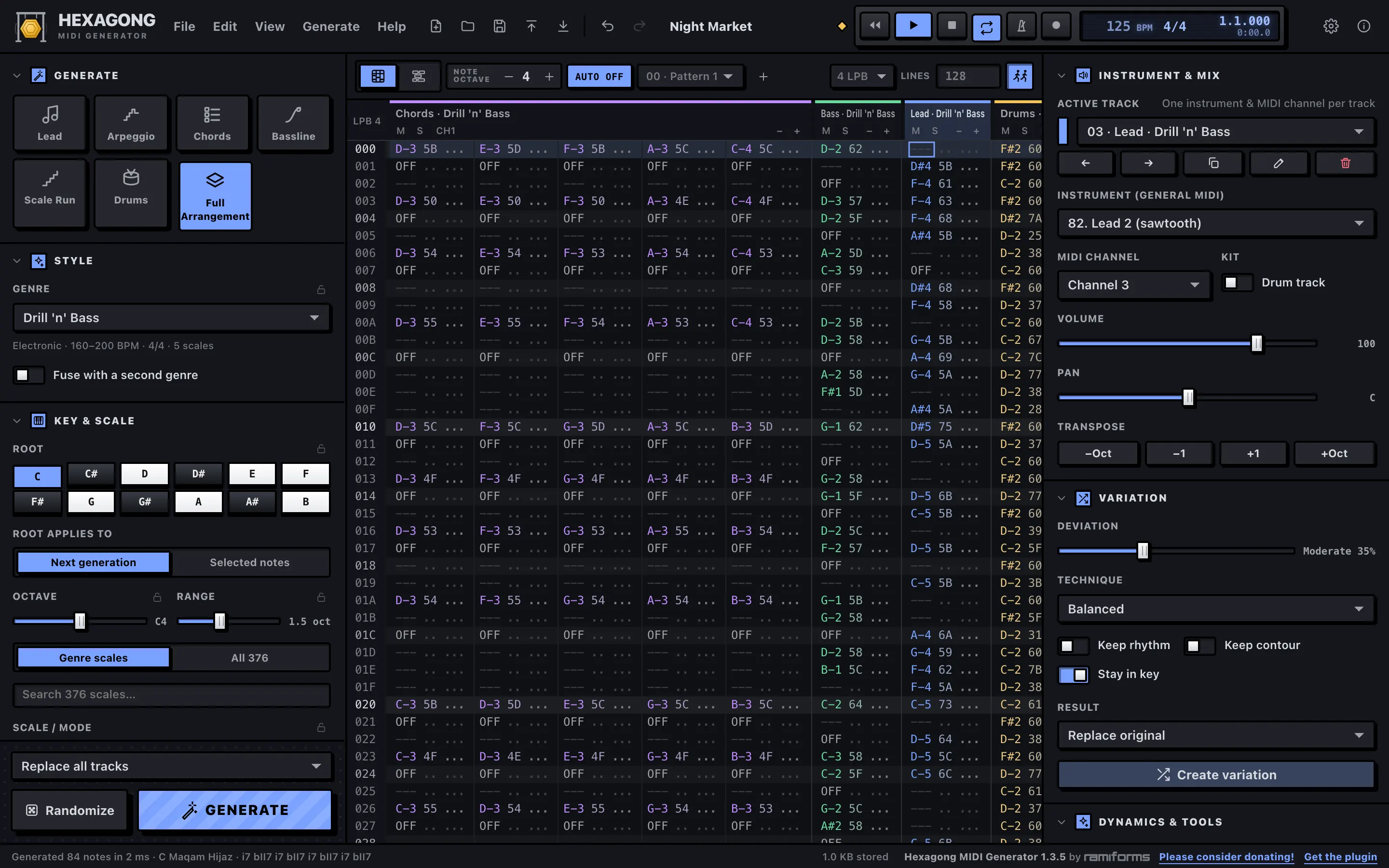
Hexagong's tracker editing a four-track drill 'n' bass pattern
Guided tour

Everything on one screen

Hover or tap the numbered points to see what each part of the interface does.
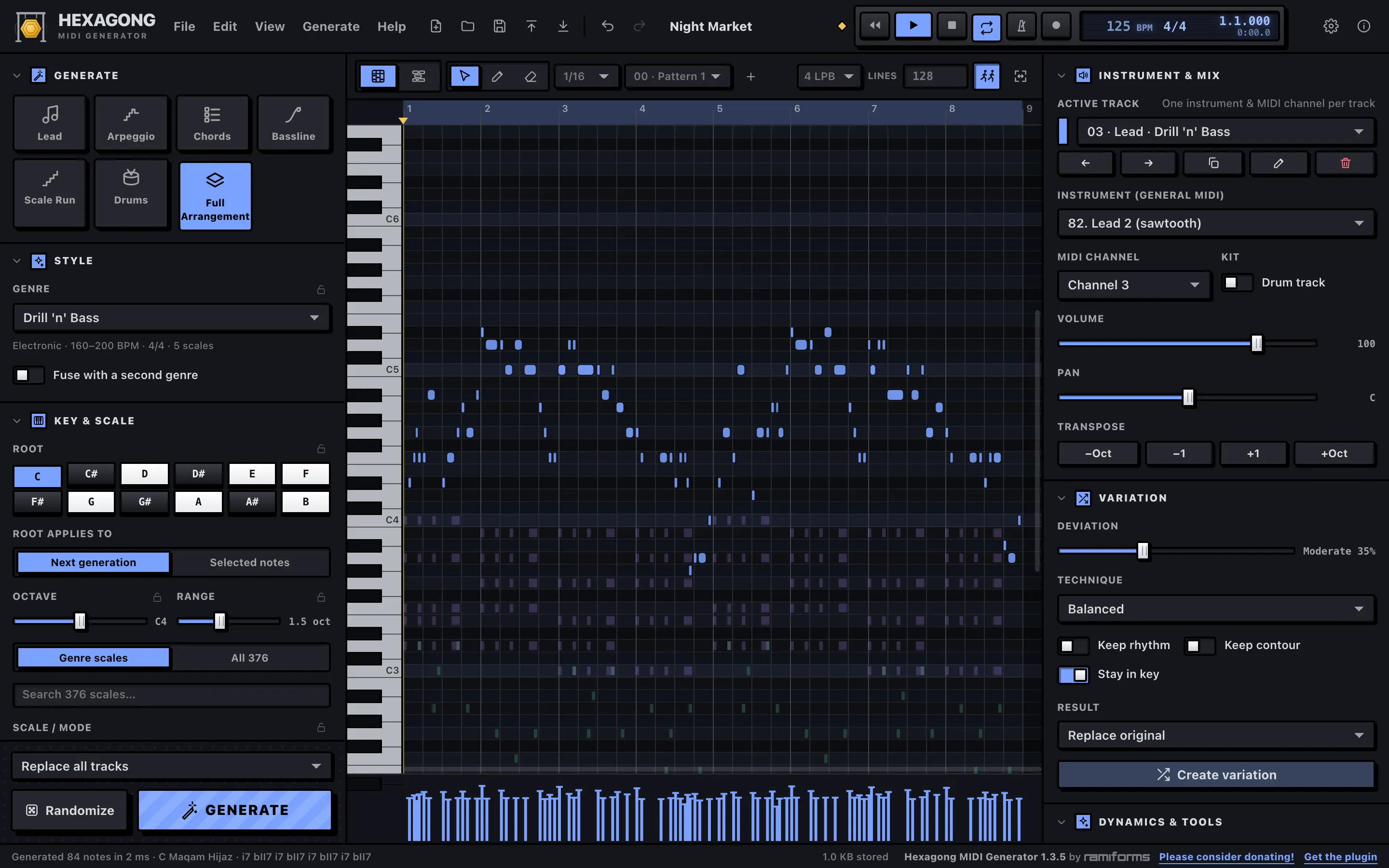
The Hexagong interface: generator on the left, piano roll in the middle, track and sound settings on the right
  1. 1Menus — File, Edit, View, Generate and Help: projects, exports, patterns and views.
  2. 2Quick actions — New, open, save, import MIDI, export, undo and redo, one click each.
  3. 3Transport — Play, stop, loop the pattern or play the whole song, metronome and step-recording from a MIDI keyboard.
  4. 4Tempo & position — Drag or type the BPM, set the time signature and watch bar · beat · tick.
  5. 5What to generate — Lead, arpeggio, chords, bassline, scale run, drums — or a full arrangement at once.
  6. 6104 genres — Each genre sets its own scales, tempo, swing and feel. Fuse two for hybrids.
  7. 7Key & scale — Root, octave, range and 376 scales and modes — or re-root the notes you selected.
  8. 8Where results go — Replace all tracks, only the active track, or drop the result into a brand-new pattern.
  9. 9Generate — Instant, seeded results. Randomize changes everything you have not locked.
  10. 10Pattern editor / Sequencer — Edit one pattern, or arrange patterns into a song (F2 / F4).
  11. 11Patterns — Pick any pattern (in the order you made them) or create a new one with +.
  12. 12LPB & length — Lines per beat and pattern length, shown in lines or bars (8–512 lines).
  13. 13Piano roll or tracker — Draw, drag and resize notes — or type them tracker-style with hex volume and delay columns.
  14. 14Velocity lane — Paint dynamics straight onto the notes.
  15. 15Track & instrument — One of 128 General MIDI instruments and one MIDI channel per track, plus volume and pan.
  16. 16Variations — Re-imagine a part from subtle to wild, keeping its rhythm, contour or key if you like.
  17. 17Resizable panels — Drag the grip to give the editor more room. Sizes are remembered.
The Lab

A lab full of new ideas

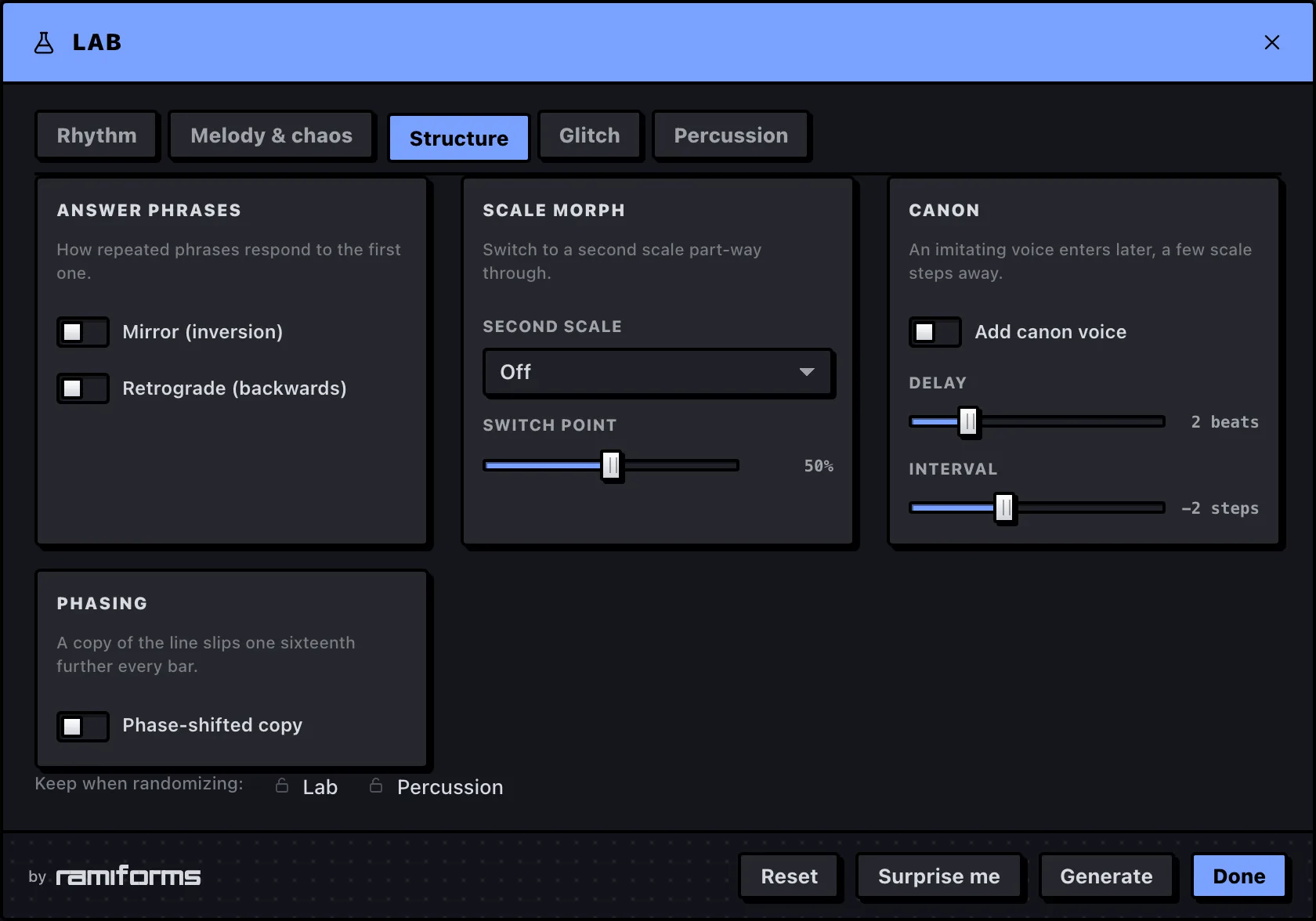
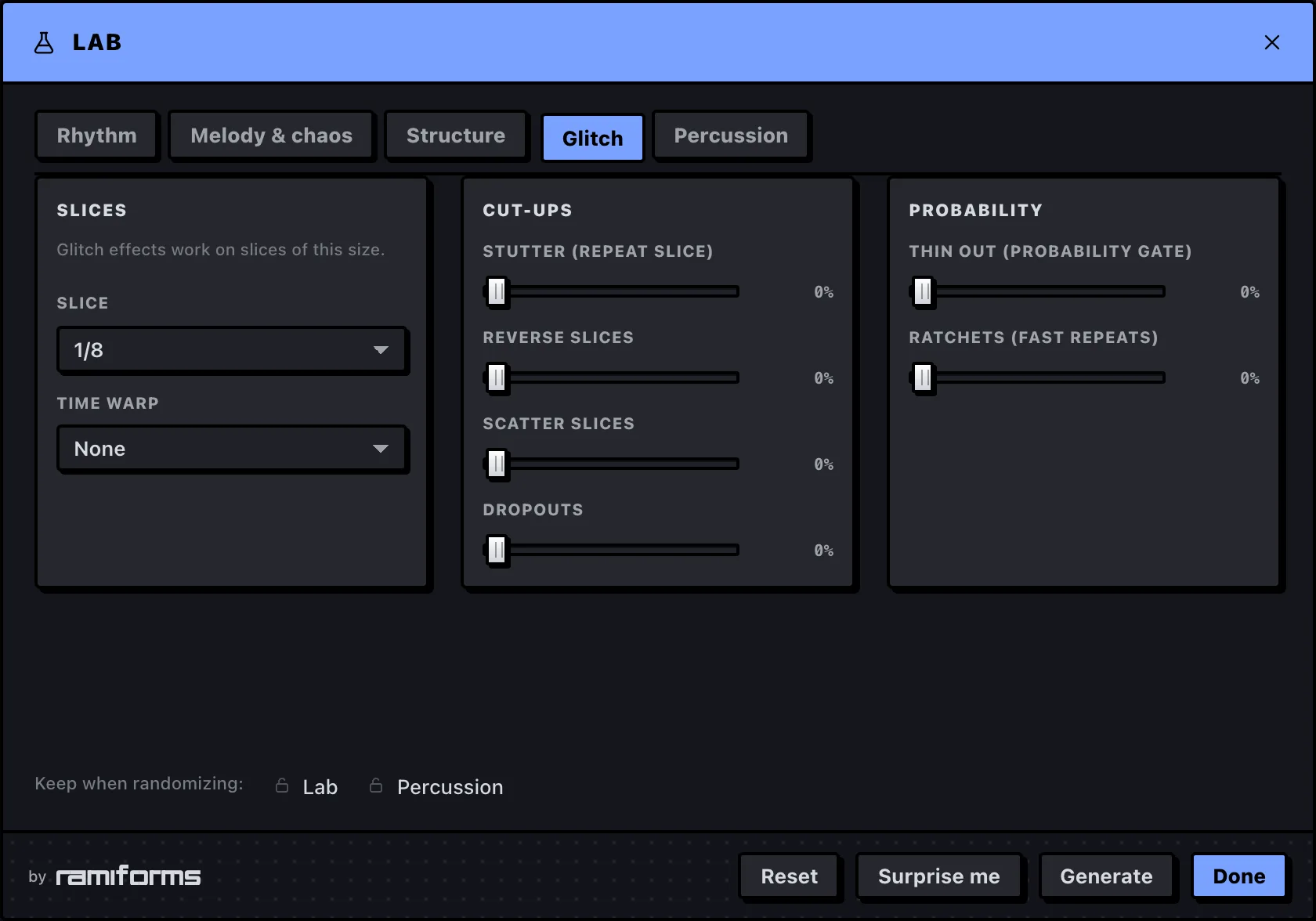
Five tabs of algorithmic and chaotic tools that reshape how rhythms and melodies are born. Every result is seeded, so the result you love can be reproduced exactly — and separate locks keep your Lab settings when you randomize everything else.
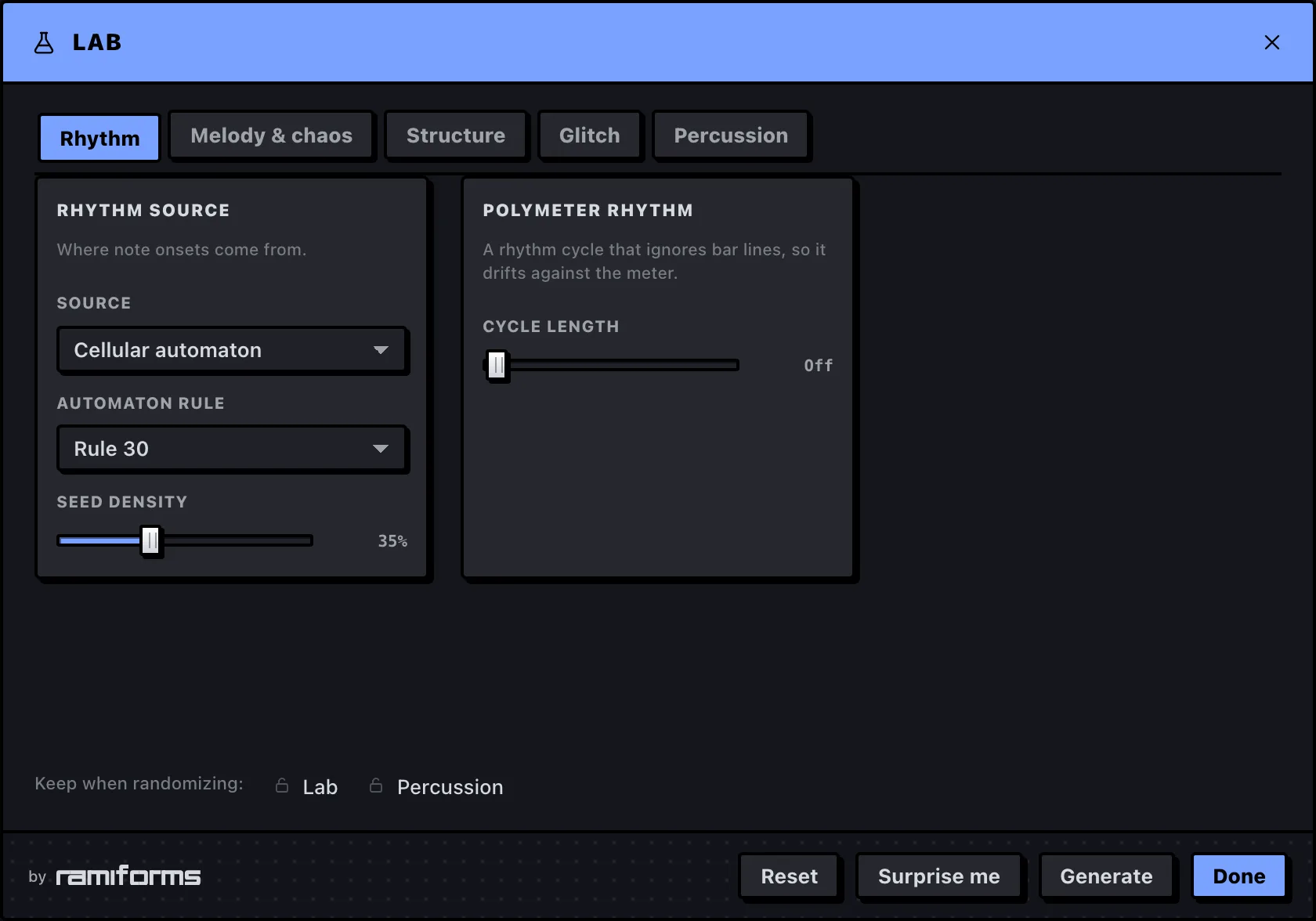
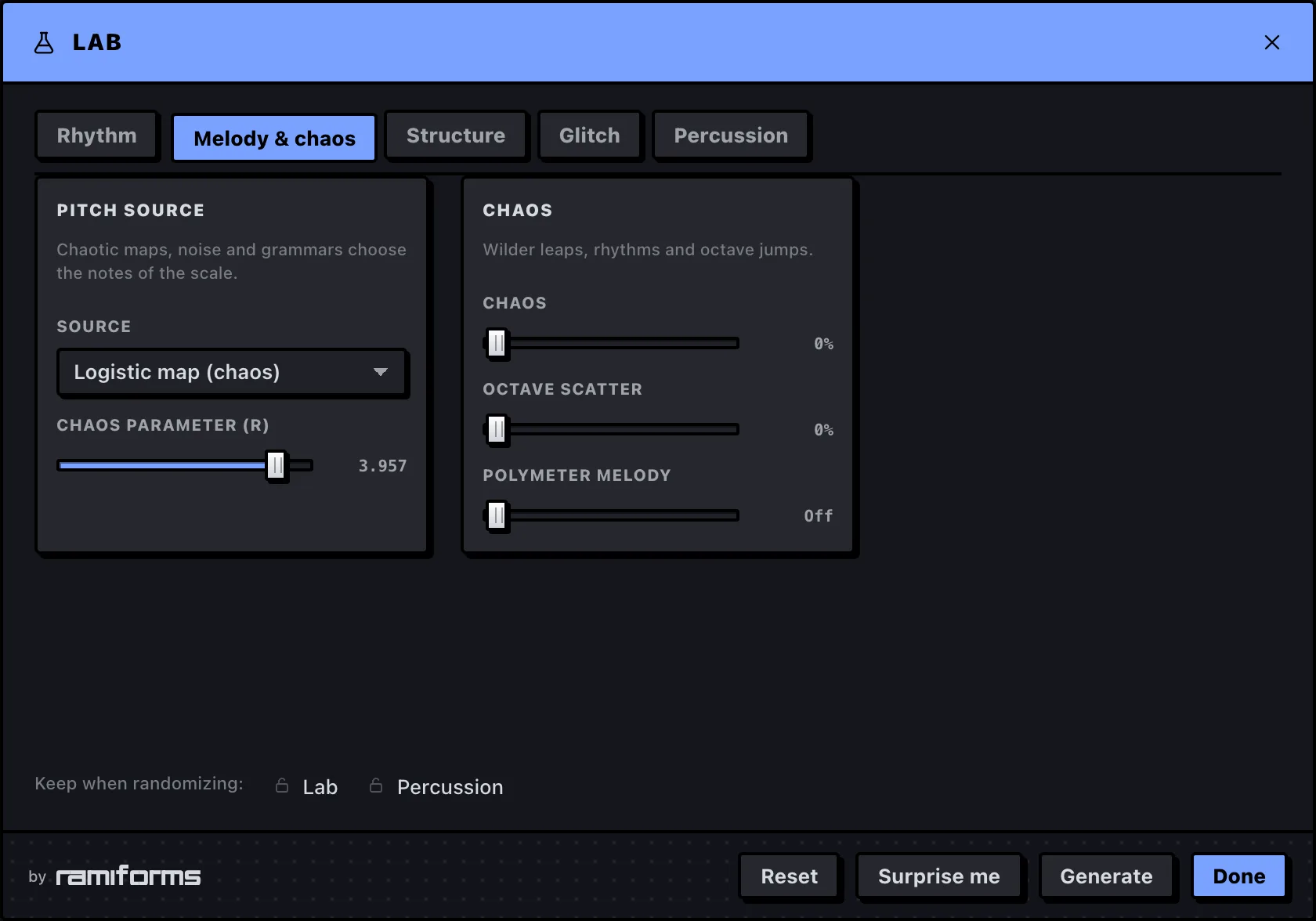
Where the onsets come from

  • Euclidean rhythms with rotation and per-bar mutation
  • Cellular automata — any elementary rule from 0 to 255, evolving bar by bar
  • Thue–Morse and Fibonacci words for self-similar, never-quite-repeating grooves
  • Logistic-map gates: onsets switched by a chaotic system
  • Polymeter cycles that run across the bar line
The Lab dialog, Rhythm tab
Genres & fusion

104 genres. 376 scales. Every crossing.

Each genre carries its own scales, progressions, tempo range, meters, swing, ornaments, chord rhythm, bass style, drum groove and instruments. Choosing one sets everything up; you can still pick any of the 376 scales — including 28 Arabic maqamat with true quarter-tones, all 72 Carnatic melakartas, Hindustani thaats, measured gamelan tunings, Japanese, Chinese, African and Celtic modes.

Jazz 15

  • Jazz (Straight-ahead)
  • Bebop
  • Hard Bop
  • Cool Jazz
  • Modal Jazz
  • Smooth Jazz
  • New Orleans Jazz (Dixieland)
  • Swing / Big Band
  • Gypsy Jazz (Manouche)
  • Bossa Nova
  • Latin Jazz
  • Egyptian Jazz
  • Ethio-Jazz
  • Jazz Fusion
  • Free Jazz (Experimental)

Blues, Soul & R&B 11

  • Blues (12-Bar)
  • Delta Blues
  • Chicago Blues
  • Soul
  • Motown
  • Gospel
  • R&B (Classic)
  • Contemporary R&B
  • Neo-Soul
  • Funk
  • Doo-Wop

Rock & Metal 11

  • Fifties Rock and Roll
  • Eighties Rock and Roll
  • Classic Rock
  • Hard Rock
  • Punk
  • Progressive Rock
  • Heavy Metal
  • Thrash Metal
  • Death Metal
  • Black Metal
  • Doom Metal

Electronic 22

  • Deep House
  • Classic House
  • Techno
  • Trance
  • Drum & Bass
  • Dubstep
  • Synthwave
  • Lo-fi Hip Hop
  • Ambient
  • Chiptune
  • Trap
  • UK Garage
  • Jungle
  • Breakcore
  • Drill 'n' Bass
  • IDM
  • Braindance
  • Footwork / Juke
  • Gabber / Hardcore
  • Speedcore
  • Acid Techno
  • Glitch

Pop, Hip Hop & Americana 8

  • Pop
  • K-Pop
  • Hip Hop (Boom Bap)
  • Reggae
  • Disco
  • Country
  • Bluegrass
  • Folk

Latin 5

  • Salsa
  • Tango
  • Flamenco
  • Reggaeton
  • Cumbia

Classical & Cinematic 6

  • Baroque
  • Classical Era
  • Romantic
  • Impressionist
  • Film Score (Epic)
  • Minimalism

World & Traditional 26

  • Egyptian Saidi
  • Egyptian Baladi
  • Arabic Maqam (Classical Takht)
  • Khaleeji (Gulf)
  • Turkish Makam
  • Persian Classical
  • Klezmer
  • Greek Rebetiko
  • Balkan Brass
  • Indian Hindustani
  • Indian Carnatic
  • Bollywood
  • Javanese Gamelan
  • Balinese Gamelan (Kebyar)
  • Sundanese Degung
  • Japanese Traditional
  • Japanese City Pop
  • Chinese Traditional
  • Mongolian (Long Song & Khoomei)
  • Irish Folk (Jig & Reel)
  • Scottish Highland
  • West African Highlife
  • Afrobeat
  • Ethiopian (Qenet)
  • Andean
  • Hawaiian Slack-Key

How does genre fusion work?

Blend any two genres and choose what crosses over: scales, rhythm, harmony — or all three. Pick two genres and move the slider. Each step of the fused part is taken from one genre or the other, and tempo, swing and feel meet in between (values from the app's real genre profiles).

50 / 50
Extended percussion & chaos

Percussion with endless variation

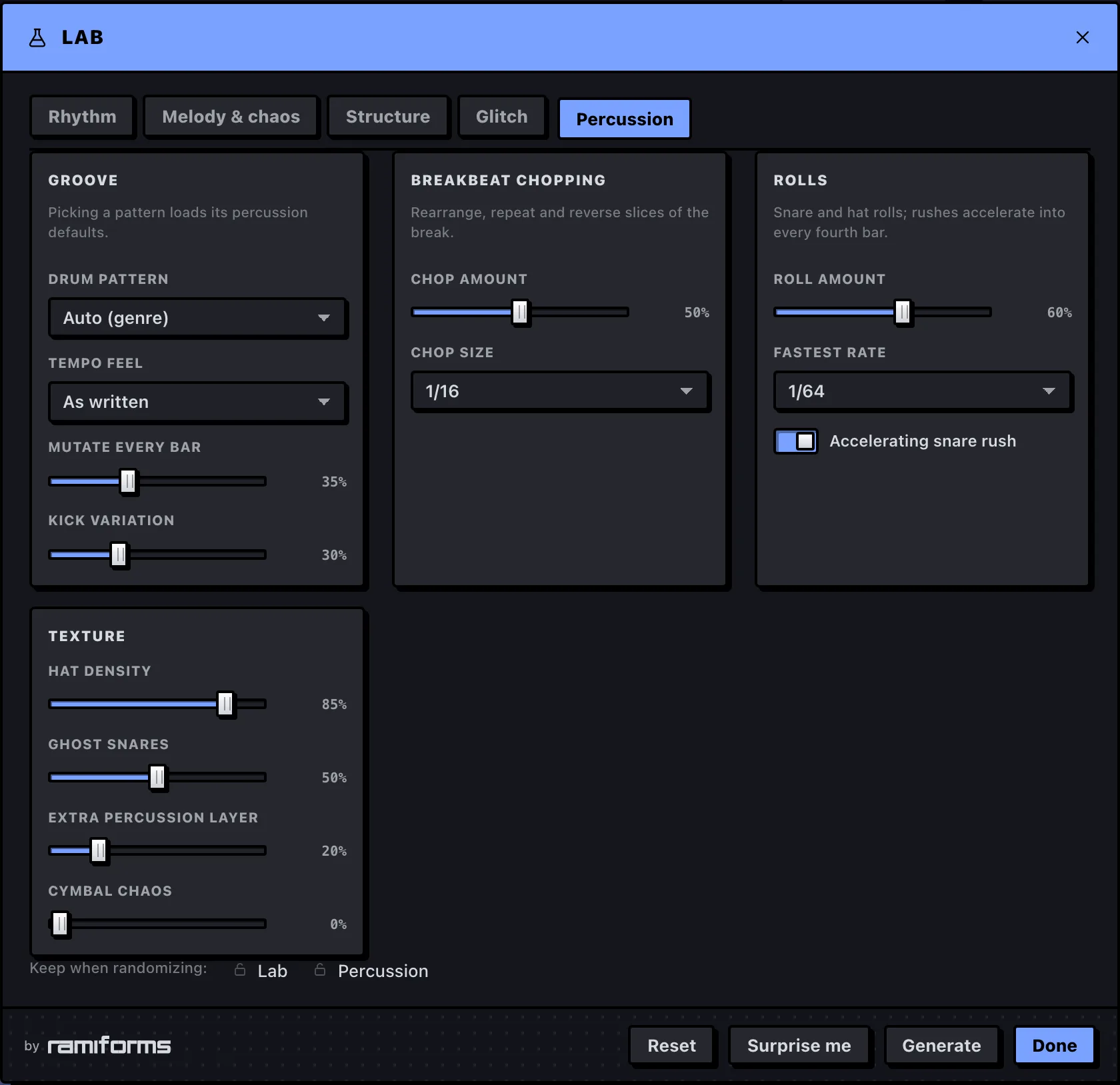
A percussion engine built for fast, broken electronic music — and for anything else with a pulse. Every amount is a slider; every drum pattern loads sensible defaults you can push as far as you like.

70Drum patterns

From rock, swing and blast beats to iqa'at, teentaal, kendang, bodhrán — and two-bar breakbeats built for chopping.

1/64Rolls & rushes

Snare and hat rolls at 1/32, 1/32T, 1/64 or 1/64T, plus snare rushes that accelerate into every fourth bar.

✂Break chopping

Every slice can be replaced, repeated or reversed — material borrowed from the bar before keeps it coherent.

½×2Tempo feel

Half-time, double-time, or switch between them every two bars without touching the tempo.

∿Noise-shaped hats

Density from sparse eighths to 1/32 streams, with velocities shaped by simplex noise.

⟳Mutation

Each bar can drift from the last: displaced kicks and snares, shifting accents, extra hits.

Chaos, on tap

x→rx(1−x)Logistic map

The classic route to chaos, tunable from the edge of order to full turbulence.

CACellular automata

Rhythms that evolve bar by bar according to any of 256 elementary rules.

F→F+FL-systems

Grammars that grow melodies the way plants grow branches.

12Serial rows

All twelve pitch classes before any repeats, in prime, retrograde and inversion forms.

Possibilities

What the percussion can do

Eight clips, each generated in one click and recorded straight from Hexagong's built-in playback (sampled General MIDI instruments and the built-in drum kit). Export the MIDI and they'll play through any sounds you like.

Jungle

168 BPM · generated, then recorded from the app

A two-bar break, chopped and re-sequenced, with ghost snares under a reese bass and lush minor ninths.

Drill 'n' Bass

180 BPM · generated, then recorded from the app

Rolls down to 1/64, hats at 85% density and an accelerating snare rush into every fourth bar.

Breakcore

220 BPM · generated, then recorded from the app

Tempo feel switches between half- and double-time every two bars while cymbals crash on chaotic accents.

Footwork / Juke

160 BPM · generated, then recorded from the app

Kicks on a sixteenth-triplet grid, clapped backbeats and triplet rolls.

Acid Techno

140 BPM · generated, then recorded from the app

Four-to-the-floor with an acid sixteenth bassline, rimshot patterns and a mutating percussion layer.

IDM via the Lab

140 BPM · generated, then recorded from the app

Melody from the logistic map, then stutter, slice-scatter and ratchets from the Glitch tab.

Maqam Rast

110 BPM · generated, then recorded from the app

Arabic maqam with true quarter-tones, ornaments and a maqsum-family iqa on hand percussion.

Gamelan × Deep House

90 BPM · generated, then recorded from the app

Genre fusion: slendro and pelog scales meet house chords, offbeat bass and four-on-the-floor.

Recipes to try

  • Chopped jungle
    Genre Jungle · Chop 30–50% · Ghost snares 20% · Hat density 55%
  • Hyper-detailed rolls
    Drum pattern Drill 'n' Bass · Rolls 60% · Fastest rate 1/64 · Snare rush on
  • Tempo-switching chaos
    Genre Breakcore · Tempo feel Switch every 2 bars · Cymbal chaos 50%
  • Rolling triplets
    Genre Footwork / Juke · Rolls 25% at 1/32 triplets · Kick variation 20%
  • Wall of kicks
    Genre Gabber or Speedcore · Kick variation · Rolls into the drop
  • Self-similar grooves
    Rhythm source Thue–Morse or Cellular automaton, rule 110 · Percussion layer 40%
  • Half-time drop
    Any break · Tempo feel Half-time · Ghost snares 30% · Hats 60%
  • Glitched hand drums
    Genre Egyptian Baladi · Glitch stutter 30% · Ratchets 40%
Under the hood

Fast, private, portable

NOADS!

Offline
An installable web app with a service worker: after the first visit everything works without a connection. Sampled instruments are cached as you use them (or all at once), and a built-in synth needs no download at all.
MIDI export
The entire song as one MIDI file, every track as its own file in a ZIP, one track, or just the selected notes. Each export saves the project first, so the file always matches what you see. Tempo, meter, key, instruments, channels, volume and pan are included; quarter-tones are written as per-note pitch bend.
MIDI import
Drag and drop a .mid anywhere — add it to the current project or open it as a new one. Long files are split into patterns automatically.
Web MIDI
Play through and step-record from a MIDI controller, and send playback to hardware or your operating system's General MIDI synth (such as Microsoft GS Wavetable Synth) with exact timing — program, volume, pan and pitch bend included.
Editing
A tracker with multi-column tracks, hex volume and delay columns and keyboard note entry; a piano roll with a velocity lane; a sequencer for arranging patterns; undo for everything.
Your data
Projects stay in your browser — no account, no upload. Back up and restore everything as one file.
Lightweight
Plain JavaScript with no UI framework and canvas-drawn editors: about 120 KB of compressed code, smooth even with 512-line patterns.
Looks
Neo-brutalist interface with 14 theme families, light and dark, 10 accent colors and resizable panels.
Out now

Powerful native plugin

  • VST
  • Audio Unit
  • LV2

Hexagong for your DAW, with the same genres and scales. It follows your tempo and transport, breeds variations, plays from pads, and hands you MIDI by drag and drop.
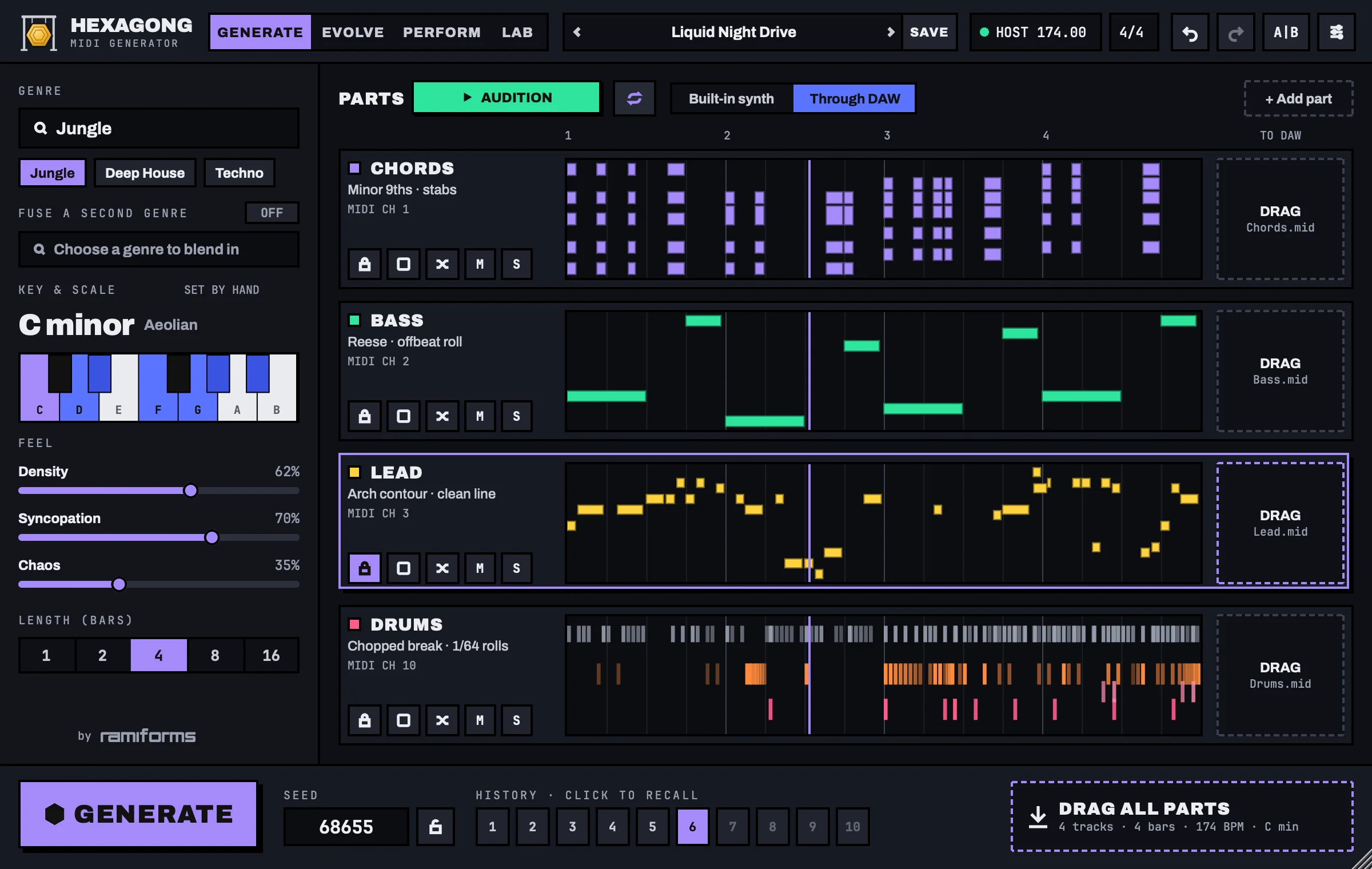
  • 450 factory presets, with audition
  • Evolve: nine bred variations, then cross-breed your favorites
  • Perform: chord pads, phrase pads and chord follow
  • Lab: automatable macros and deeper chaos sources
The Hexagong plugin's Generate screen, with chords, bass, lead and drums in lanes

Web app or plugin?

The web app is a complete workspace, and free. The plugin gives up its own editor and song tools to fit inside your DAW.

 FeatureWeb appPlugin
Getting started
Where it runsAny modern browser, or installed as an appInside your DAW as a plugin, or on its own as an app
PriceFreeA one-time purchase, on Gumroad
Making parts
Melody sources10, from a melodic walk to twelve-tone rows16, adding Lorenz, Rossler and Clifford attractors, three-body and Mandelbrot orbits, and a model trained on your MIDI
VariationsOne at a time, with five techniquesBreeds over a thousand candidates and shows nine, with similarity scores, cross-breeding and a family tree
PresetsSaved projects; no preset library450 factory presets with search, tags, favorites and audition, plus your own
Editing and arranging
Note editingA tracker and a piano roll with a velocity laneNone: parts are read-only previews, and you edit in your DAW
Song arrangementPatterns and a sequencerNone: you arrange in your DAW. Change Over Time can render long sections with rising chaos and fills
Sound and MIDI
TimingIts own transport, tempo and meterFollows your DAW’s tempo, meter and transport
Sounds128 sampled General MIDI instruments, a built-in synth and a drum kitA small preview synth, or any instrument in your DAW, with one MIDI channel per part
Getting MIDI outExport the song, each track in a ZIP, one track, or the selectionDrag parts, variations, captures and renders straight into your DAW, or send MIDI live
Playing live
KeyboardPlay through a controller, and step recordChord pads, phrase pads, chord follow, and a melody zone that snaps wrong notes to the scale
AutomationNoneEight macros and the main settings, automatable from your DAW, with MIDI learn

See the full comparison

Intuitive & powerful

Free · runs in your browser · works offline · exports MIDI

Launch Hexagong

Working in a DAW? Get the Hexagong plugin